
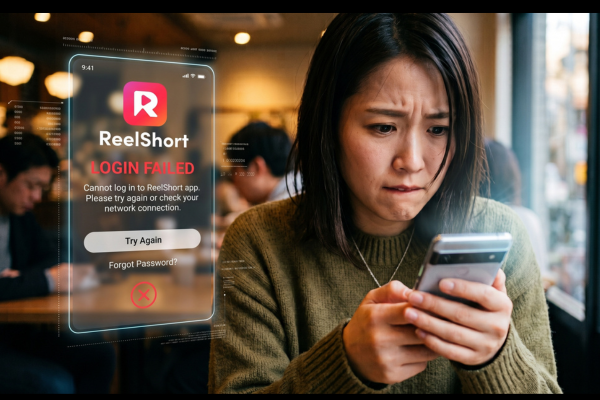
Getting stuck on a frozen screen? Or missing coins right at a cliffhanger? That is beyond frustrating.
Luckily, reaching ReelShort customer service is easy. Instead of hunting for a support email, just use their built-in ReelShort help center or feedback website portal.
Learn now the fastest way to fix account glitches and get right back to your show.
- ReelShort Help Center: Solve Common Issues Quickly
- How to Contact ReelShort Support: Submit a Ticket
- Where to Find the ReelShort Feedback Portal (Website & App)
- ReelShort Support FAQs
ReelShort Help Center: Solve Common Issues Quickly
Waiting for an email reply can most probably frustrating. Especially, when you just want to get back to watching your favorite series. Good thing, the fastest way to resolve common app problems is by using the official ReelShort feedback portal.
With this Help Center articles, you are now allowed to troubleshoot or even fix minor issues instantly just by yourself! It is designed to save you and your valuable time. It offers immediate solutions without requiring direct contact with an agent.

This page allows you to troubleshoot independently. The portal categorizes solutions so you can find exactly what you need to fix:
Payment Issue
If your coin recharges don’t show up after a purchase, this is the place to go.
It can give you an instant steps on how to restore purchases or deal with bank charges that went through without giving you your coins. Sorting these billing hiccups out quickly means you can get right back to watching.
App Features
Getting the hang of a new streaming app can be a little confusing at first.
But in this section, you will get answers to basic questions about using the menus, saving shows to your watchlist, and tweaking your notifications. A quick look here will help you figure out exactly how the platform works.
Subscription Issue
Managing your premium account should not be that hassle, right? But with ReelShort help center portal, it will walk you through the entire process easily.
It clearly explains how to upgrade your plan, renew your access, or cancel your membership. All without you hitting a surprise charges. These guides make it easy to stay on top of your billing cycle.
Technical Issue
There is nothing worse than an app crashing right in the middle of a good scene. In this category, it tackles common headaches like endless loading screens.
Here it will show you how to clear your cache or check your connection. Trying these quick fixes can usually get your video playing again without needing to wait for a support agent anymore.
Earn Rewards
Watching ads and finishing daily tasks is a great way to unlock episodes for free. If you don’t receive your coins after putting in the time, this section will explains how to track down those missing bonuses.
It will show break downs of the daily limits. And helps make sure you actually get the rewards you earned.
Account Issue
Getting locked out of your profile is stressful, especially when your watch history and purchased coins are tied to it. This category helps you reset passwords, recover a lost account, and fix those annoying login errors.
You’ll also learn how to link your Google or Apple ID to keep your account safe and easy to access.
Ads Issue
Since many viewers rely on ads to unlock episodes, a broken commercial can completely ruin your watch time.
Here, you’ll find fixes for ads that freeze your screen, stay black, or just won’t load at all. Getting these sorted out keeps your app running smoothly so you can keep watching for free.
Episode Issue
A good show is easily ruined by missing subtitles or audio that doesn’t match the video. If an episode gets cut off or plays incorrectly, this section lets you report that specific chapter.
When you pinpointing the exact problem, it helps the team fix the video file right away. By this, everyone else can enjoy ithe show too.
How to Contact ReelShort Support: Submit a Ticket
ReelShort Help Center is packed with incredibly helpful guides that easily solve the most of app issues right on the spot. However, if you happen to run into a rare, complex problem that those articles don’t quite cover, reaching out for backup is still incredibly easy.
Just use the Contact Us feature located on that same feedback page to fill out a quick form. Submitting this sends a ticket directly into the official ReelShort customer support email queue.
From there, a real person will review your details and step in to get everything running smoothly again.
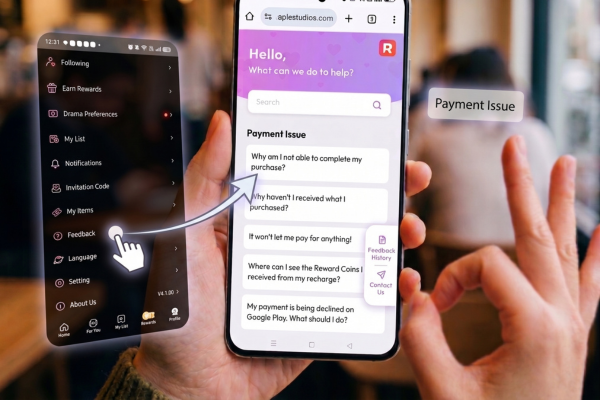
Here are the steps and details to include when requesting support:
1. Pick the exact category from the dropdown menu
Take a second and scroll throughly the options. Find the one that best fits to your situation. If you bought coins that never showed up, then select “Payment Issue.”
Or if your screen goes black every time you load a specific show, then choose “Technical Issue.” When categorizing your problem ensures the correctness so your ticket goes straight to the right department.
2. Walk them through exactly what happened
Use the description box and state a clear picture of your concern. In this step, instead of just saying “the app is broken,” tell the support team exactly what you were doing right before the glitch hit.
Also, mentioning the name of the series, the specific episode number, and what buttons you tapped right before the error popped up. These give them the play-by-play takes. It helps the developers track down a fix much faster.
3. Upload your proof
Telling the support team about the problem is helpful, but actually showing them is even better. Take a quick screenshot of the error code, or even better, record your screen as the app crashes.
If you are dealing with a billing headache, grab a screenshot of your digital receipt directly from your Apple App Store or Google Play purchase history. Attaching these visual files is the absolute best way to speed up your ticket.
4. Double-check your contact details
Before you hit that submit button, read over the email address you typed in. One tiny typo means the support team’s reply will bounce back into the void, leaving you waiting for an answer that will never arrive.
Make sure you use an active email address that you actually check daily.
What happens next?
Once you send the ticket off. The ReelShort team will dig into your account details and investigate the bug. Also, a support agent will reply directly to the email you provided with a specific, personalized fix.
Keep a close eye on your inbox over the next 24 to 48 hours. And remember to peek at your spam or junk folder just in case their response accidentally got filtered out.

Pro Tips to Get Your Issue Fixed Faster:
- Paste your exact User ID: You can find this number right on your app profile page. Put it at the very top of your message.
- Name your device: Let the agent know if you are watching on an iPhone, an Android phone, an iPad, or a web browser, as the bugs are often completely different for each.
- Send the receipts: Always attach those clear screenshots of error codes or payment confirmations.
- Verify your email: Check it twice so you don’t miss their help!
Where to Find the ReelShort Feedback Portal (Website & App)
You can easily find ReelShort support portal. Organically, you can find from either the website or the mobile app. Finding this page takes just a few seconds, regardless of which device you prefer to use for streaming. And both platforms provide a straightforward path to ensure you reach the help center exactly when you need it.

- Via the Official Website: Go to the ReelShort homepage, scroll all the way to the bottom footer, and click the Feedback link.
- Via the ReelShort App: When you open the app, go straight to your Profile (this is the icon in the bottom right corner), and tap Settings or the Help/Feedback icon to access the support portal.
ReelShort Support FAQs
Q: What are ReelShort’s customer service hours?
ReelShort support team is open and operates Monday to Sunday, starting at 12:00 AM to 8:00 AM (ET).
Q: How long does it take for ReelShort support to reply?
Agents will usually and typically respond to your provided email address within 24–48 hours.
Q: How do I find my ReelShort User ID?
Open the ReelShort app, then go to your Profile. Tap your ID number to copy it to your clipboard.
Q: What should I do if my payment failed?
Visit the Help Center’s “Payment Issue” section. If troubleshooting still fails, submit a support ticket. Then attach your digital receipt.